



Ensora Data Collection is an ABA-focused data collection and clinical programming platform designed for BCBAs, RBTs, behavior technicians, supervisors, and ABA organizations. Formerly known as Catalyst, it combines a web portal with a mobile app for recording behavioral and skill-acquisition data, managing programs, reviewing graphs, completing documentation, and monitoring client progress.
Ensora’s current Knowledge Hub officially identifies Data Collection as the product formerly known as Catalyst and lists integrations with Ensora ABA Therapy and CodeMetro.
Unlike a basic electronic data sheet, the platform supports ABA-specific workflows including baseline, acquisition, maintenance, discrete trials, task analysis, behavior reduction, ABC data, prompting, mastery criteria, curriculum libraries, assessments, SOAP notes, and reporting.
This guide explains how Ensora Data Collection works in 2026, its main features, setup process, supported ABA data types, assessments, VB-MAPP functionality, offline mode, syncing, integrations, security, licensing considerations, limitations, and common troubleshooting steps.
Quick Answer
Ensora Data Collection is an ABA data collection platform formerly known as Catalyst. It helps BCBAs, RBTs, and other ABA professionals create treatment programs, record client data, track progress, and generate reports.
The platform supports common ABA measurement methods such as frequency, duration, interval recording, task analysis, ABC data, and skill-acquisition tracking. It also offers offline data collection, graphs, clinical notes, assessments, and integrations with other Ensora products.
Key Takeaways
- Ensora Data Collection was formerly known as Catalyst.
- The web portal handles most administration, programming, reporting, and configuration.
- The mobile app is primarily used to collect data during ABA sessions.
- Multiple ABA measurement systems are supported.
- Staff can collect supported data offline and sync it later.
- VB-MAPP is available but uses additional licensing.
- Curriculum libraries can speed up program development.
- Security groups and Sites help organizations control access.
- Ensora integrates with broader practice-management products.
- The platform continues to receive updates and fixes in 2026.
What Is Ensora Data Collection?
Ensora Data Collection is specialized software for Applied Behavior Analysis data collection, programming, and progress monitoring.
The platform is designed around common ABA workflows rather than functioning as a generic survey, spreadsheet, or note-taking application.
Clinicians can configure areas such as:
- Skill Areas
- Programs
- Targets
- Behaviors
- Prompts
- Baseline criteria
- Mastery criteria
- Maintenance
- Forms
- Assessments
- Reports
Direct-care staff can then use the configured programming during client sessions. Ensora Data Collection helps connect clinical program setup with in-session data collection and later progress review.
At a simple level, the platform has three main components:
| Component | Main Purpose |
|---|---|
| Web portal | Administration, programming, configuration, graphs, and reports |
| Mobile app | In-session data collection and documentation |
| Integrations | Connect clinical information with related practice-management platforms |
This division is important because not every feature available in the web portal can be performed directly from a phone or tablet.
Is Ensora Data Collection the Same as Catalyst?
Yes.
Ensora Health describes Ensora Data Collection as formerly known as Catalyst.
That is why users may still encounter several names while researching or troubleshooting the platform:
- Ensora Data Collection
- Catalyst
- Catalyst Data Collection
- DataFinch
Some older terminology still appears in the current support ecosystem.
If a training guide, staff member, or older tutorial refers to the Catalyst ABA app, it may be discussing the platform now branded as Ensora Data Collection.
This is useful to know when searching for troubleshooting information because older Catalyst documentation may still describe relevant workflows, although some features may have changed in newer releases.
How Does Ensora Data Collection Work?
A typical Ensora Data Collection workflow begins in the web portal.
A BCBA or authorized clinician may:
- Create or configure a client
- Establish baseline and mastery criteria
- Build Skill Areas, Programs, and Targets
- Configure prompts and behavior tracking
- Assign the client to appropriate staff
- Synchronize programming to the mobile app
An RBT can then collect data during treatment sessions.
After the session, the collected information can sync back to the system for graphing, reporting, documentation, and clinical review.
The workflow can be summarized as:
Program creation → session data collection → synchronization → analysis
This connected workflow is one reason ABA organizations may prefer dedicated data collection software instead of managing separate paper records and spreadsheets.
Who Is Ensora Data Collection For?
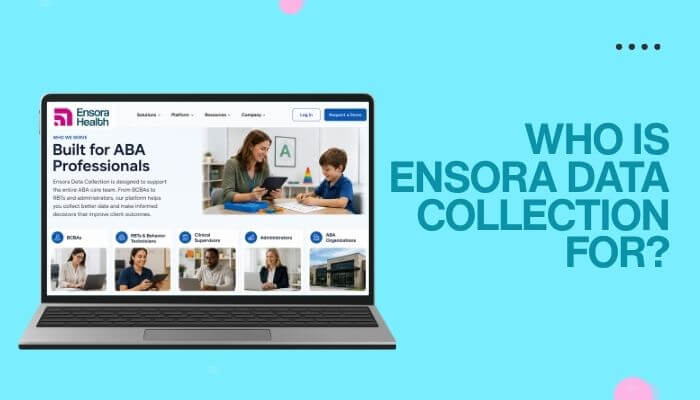
Ensora Data Collection is designed for several types of ABA professionals and administrative users.
BCBAs
Board Certified Behavior Analysts may use the platform to:
- Create programs
- Establish targets
- Configure prompts
- Set baseline criteria
- Define mastery criteria
- Review data
- Monitor graphs
- Manage maintenance
- Analyze treatment progress
- Prepare reports
RBTs and Behavior Technicians
Direct-care staff may use the mobile app to:
- Access assigned clients
- Run programs
- Record responses
- Collect behavior data
- Enter ABC information
- Complete documentation
- Synchronize session data
Clinical Supervisors
Supervisors may receive additional access to:
- Client programs
- Graphs
- Reports
- Staff activity
- Clinical documentation
Administrators
Organization administrators may manage:
- Users
- Security groups
- Permissions
- Sites
- Client access
- Custom fields
- Forms
- Subscriptions
- Integrations
Access should be based on each user’s role and responsibilities rather than giving every employee broad administrative permissions.
Skill Acquisition in Ensora Data Collection
Ensora Data Collection organizes skill-acquisition programming into three main levels:
| Level | Role |
|---|---|
| Skill Area | Broad category of skills |
| Program | Specific skill or teaching program |
| Target | Individual learning objective |
Ensora’s programming documentation confirms that Skill Areas, Programs, and Targets form the core structure used for skill-acquisition programming.
For example:
Skill Area: Communication
Program: Receptive identification
Target: Identifies “cup”
This hierarchy helps clinicians organize larger treatment programs clearly while keeping individual learning targets grouped under the appropriate program and skill area.
Main Ensora Data Collection Features
Custom ABA Programming
Ensora Data Collection allows organizations to customize programming instead of using the same setup for every client.
Programs can include:
- Baseline
- Acquisition
- Maintenance
- Cold probes
- Prompt levels
- Errorless teaching
- Individualized target settings
This flexibility helps clinicians adapt programming to different treatment goals and is one of the main advantages of dedicated ABA software compared with a basic electronic form.
Baseline Data Collection
Baseline data shows a client’s current performance before or at the start of intervention.
In Ensora Data Collection, targets generally need to be configured correctly in the web portal before baseline data can be collected through the mobile app.
This information gives clinicians a starting point for comparing future performance and monitoring progress over time.
If a target does not appear correctly in the app, check its status and configuration in the portal before making other changes.
Discrete Trial Data
Ensora supports discrete-trial data collection for programs in which individual teaching opportunities are scored.
Clinicians may configure:
- Targets
- Prompts
- Response options
- Mastery rules
- Trial requirements
Data collected across trials can later contribute to progress graphs and reports.
Task Analysis
Task analysis breaks a larger activity into smaller, teachable steps.
It can be useful for skills such as:
- Dressing
- Hygiene
- Household routines
- Classroom tasks
- Vocational activities
- Other multi-step skills
Ensora fixed an intermittent issue in February 2026 in which Task Analysis steps did not reliably sync to the mobile app. This is a good reminder to keep the platform updated and review current release notes when troubleshooting.
Behavior-Reduction Data
Ensora provides several ways to record behavior rather than relying only on frequency counts.
Available methods can include:
- Frequency
- Rate
- Duration
- Whole interval
- Partial interval
- Momentary time sampling
- ABC data
Each method measures a different aspect of behavior, so clinicians should select the approach that matches the treatment plan and clinical objective.
ABC Data Collection
ABC refers to:
- Antecedent—what happened before the behavior
- Behavior—what was observed
- Consequence—what happened afterward
ABC data can help clinicians document the context surrounding a behavior and identify patterns worth reviewing.
Ensora distinguishes ABC event data from traditional per-behavior measurements such as frequency.
These records can provide useful observations, but the software does not replace qualified clinical interpretation or a properly designed functional assessment.
What Types of Data Can Ensora Collect?
The platform supports multiple ABA measurement formats.
| Data Type | Typical Use |
|---|---|
| Discrete trials | Trial-by-trial skill performance |
| Task analysis | Performance across steps in a sequence |
| Frequency | Number of behavior occurrences |
| Rate | Occurrences relative to observation time |
| Duration | Length of a behavior or response |
| Whole interval | Behavior occurs throughout the interval |
| Partial interval | Behavior occurs at any point in the interval |
| Momentary time sampling | Behavior is checked at a specific observation point |
| ABC data | Antecedent, behavior, and consequence information |
| Baseline | Performance before or at the start of intervention |
| Skill acquisition | Progress toward learning targets |
Ensora Data Collection can make these measurements easier to record, organize, and review, but clinicians still need to choose the measurement method that best fits the treatment goal.
Mastery and Maintenance Criteria
Ensora can use mastery rules to help determine when certain targets are ready to progress.
Criteria may include:
- Performance percentage
- Consecutive sessions or days
- Minimum trial requirements
- Instructor requirements
- Other configured rules
However, automatic mastery does not apply to every target type.
Organizations should verify which targets can advance automatically and which require a clinician to make a manual change.
Maintenance settings can also help teams continue monitoring skills after acquisition instead of ending data collection immediately after a target is mastered.
Graphing and Data Analysis
One of the main advantages of digital ABA data collection is that session information can flow directly into graphs instead of being manually transferred from paper records.
Ensora’s Google Play description says its graphing tools can provide different views of learner data and analyze variables such as instructors, time of day, trial counts, and progress toward mastery.
Graphs may help BCBAs review:
- Changes over time
- Performance patterns
- Skill acquisition
- Behavior trends
- Treatment response
- Staff-related variables
However, graphs should be interpreted in context.
Qualified clinicians still need to consider data quality, measurement procedures, treatment conditions, and the client’s overall program before drawing conclusions.
Does Ensora Data Collection Include Assessments?
Yes.
Ensora Data Collection includes assessment-related tools alongside its programming and data collection features.
Depending on configuration and licensing, organizations may use:
- Preference assessments
- Functional analysis assessments
- Custom assessments
- VB-MAPP
These tools can complement routine session data collection by supporting additional clinical assessment workflows.
Assessment availability may also vary by device, so teams should confirm whether a specific workflow is available on a phone or requires a tablet.
VB-MAPP in Ensora Data Collection
Ensora includes dedicated workflows for the Verbal Behavior Milestones Assessment and Placement Program (VB-MAPP).
Its Knowledge Hub includes resources covering:
- Milestones
- Barriers
- Transitions
- EESA
- Assessment reports
Ensora also allows users to download individual VB-MAPP assessment reports.
Does VB-MAPP Cost Extra?
Yes. VB-MAPP uses separate licensing.
Ensora’s current documentation states that a client must already have an Ensora Data Collection license before a VB-MAPP license can be added. VB-MAPP licenses run for 12 months and are billed annually.
Practices should confirm current pricing directly with Ensora rather than assuming VB-MAPP is included with every Data Collection subscription.
Curriculum Libraries
Ensora Data Collection includes curriculum libraries that can help clinicians save time when building programs.
Instead of creating every target from scratch, users can access different types of libraries:
| Library | What It Includes |
|---|---|
| My Libraries | Programs created by your organization |
| Clinical Libraries | Prebuilt targets created by Ensora BCBAs |
| Community Library | Curricula shared by other users |
These libraries can be useful for organizations that regularly build similar programs for different clients.
However, prebuilt content should still be reviewed before use. Clinicians should make sure the targets, prompts, teaching procedures, mastery criteria, and maintenance settings are appropriate for the individual client.
Can You Import or Export Programming?
Yes. Ensora Data Collection supports spreadsheet-based program imports, which can make it easier to manage large amounts of programming.
This can be useful when:
- Moving programs from another system
- Managing many targets at once
- Reusing existing program structures
- Setting up programming across a larger organization
Ensora has also updated its spreadsheet importer to improve performance.
Imported programming should still be reviewed before use to make sure targets, prompts, criteria, and other settings are appropriate for the client.
SOAP Notes and Clinical Documentation
Ensora Data Collection also supports SOAP notes and session documentation.
SOAP stands for:
- Subjective
- Objective
- Assessment
- Plan
The exact documentation requirements may vary depending on the organization, payer, service type, and local rules.
Ensora continued improving its SOAP-note features in 2026. A June 18, 2026 update fixed an issue related to duplicate field labels and also prevented users from publishing notes when required fields were incomplete.
This is why teams should follow current Ensora guidance instead of depending only on older Catalyst tutorials.
Reports and Progress Monitoring
Ensora Data Collection can use session data to support progress reports and ongoing clinical review.
Reports may include:
- Graphs
- Collected data
- Progress information
- Clinical notes
- Custom report sections
This can reduce the need to copy the same information into separate systems or documents.
Ensora also supports custom progress-report options for organizations that need more specific reporting formats.
Before using a report for clinical, payer, or administrative purposes, staff should still review the information for accuracy and completeness.
Does Ensora Data Collection Work Offline?
Yes. Ensora Data Collection can collect supported data on a mobile device even when internet access is unavailable.
This can be useful during:
- Home-based ABA sessions
- School visits
- Community sessions
- Travel between clinics
- Areas with unstable Wi-Fi
However, offline data collection and syncing are not the same thing.
Data collected offline stays on the device until an internet connection is available and the information can sync back to the platform.
How Does Ensora Data Collection Sync?
Ensora Data Collection syncs information between the mobile app and the web portal.
There are three main types of syncing:
Session Data Sync
Data collected in the app is uploaded to the portal.
Client Programming Sync
Updates made in the portal can be sent to the mobile device, including:
- Programs
- Targets
- Prompts
- Other client changes
Organization-Level Sync
Forms and certain organization settings can also be refreshed on the device.
Ensora says the app needs to remain open and connected to Wi-Fi or mobile data for information to upload. The platform may process unsynced data in batches, so larger amounts of data can take longer to finish syncing.
Important Warning About Unsynced Data
One of the most important practical rules for Ensora users is:
Do not delete the app when unsynced data remains on the device.
Ensora explicitly warns that unsynced items are stored locally and says users should not remove the user or uninstall the app while those items remain.
A safer workflow is:
- Check whether unsynced items remain.
- Confirm internet connectivity.
- Keep the app open.
- Allow syncing to continue.
- Verify important information in the portal.
- Contact support if syncing remains stuck.
Deleting the application too early could result in loss of locally stored unsynced information.
Ensora Data Collection Setup
Setting up Ensora Data Collection is easier when the portal is configured before staff begin using the mobile app.
- Set up administrators: Choose the users who need access to organization settings, staff, clients, Sites, forms, licensing, and security.
- Create security groups: Set different permissions for Administrators, Supervisors, BCBAs, RBTs, and other users.
- Configure organization settings: Add prompt codes, maintenance settings, custom fields, forms, and access rules.
- Create the client profile: Add demographic details, baseline criteria, mastery criteria, behavior settings, prompts, and documentation options.
- Build or import programming: Add Skill Areas, Programs, Targets, behaviors, baseline rules, mastery criteria, and maintenance settings.
- Add staff access: Assign the correct permissions, Sites, and clients to each staff member.
- Install the mobile app: Ensora supports compatible iOS and Android devices. Kindle devices are not supported.
- Sync assigned clients: Staff can sign in and load the clients and programming available to them.
- Test before live use: Check targets, prompts, behaviors, forms, permissions, and syncing before collecting real session data.
Training and Implementation
Ensora provides training and implementation resources to help organizations set up the platform correctly and train staff before live use.
Training can cover areas such as:
- Behavior reduction
- Skill acquisition
- Target types
- Client setup
- App workflows
- Assessments
- Playlists
- VB-MAPP
Support is also available through chat, email, and phone.
Training should match each user’s role. For example, an RBT may need more focus on session data collection, while BCBAs and administrators may need deeper training on programming, permissions, reporting, and system setup.
Managing Multiple Locations With Sites
Ensora Data Collection includes a Sites feature that helps organizations organize users and clients across different locations or programs.
Sites can be used for:
- Clinics
- Geographic regions
- Classrooms
- Programs
This can be useful for both large organizations with multiple locations and smaller providers that want to separate clients by classroom or service program.
One important point is that Ensora states Sites cannot be disabled once they are enabled.
Organizations should therefore plan their Site structure carefully before turning the feature on.
Ensora Data Collection and Ensora ABA Therapy
Ensora Data Collection and Ensora ABA Therapy are related products, but they serve different purposes.
Data Collection focuses mainly on ABA programming, session data, behavior tracking, graphs, and clinical documentation.
Ensora ABA Therapy focuses more on practice-management functions such as scheduling, billing, and broader administrative workflows.
| Feature | Ensora Data Collection | Ensora ABA Therapy |
|---|---|---|
| ABA session data | Core function | Connected through integration |
| Skill programs | Yes | Not primary focus |
| Behavior tracking | Yes | Not primary focus |
| Graphing | Yes | Broader clinical workflows |
| SOAP notes | Yes | Can connect with documentation |
| Scheduling | Limited/integrated | Core workflow |
| Billing | Not primary function | Yes |
| Practice management | Limited | Core function |
Ensora’s Knowledge Hub lists Ensora ABA Therapy as an official Data Collection integration.
Ensora Data Collection and CodeMetro
Ensora Data Collection can also integrate with CodeMetro by Ensora Health.
The integration can connect information such as:
- Sites
- Agencies
- Clients
- Staff
- Appointments
Ensora says Sites in Data Collection can be mapped to corresponding agencies in CodeMetro.
This can help reduce duplicate administrative work for organizations that use both systems.
Organizations should still review mappings carefully before relying on integrated data for documentation, scheduling, or billing workflows.
How Does Ensora Data Collection Licensing Work?
Licensing is an important part of evaluating Ensora Data Collection.
Ensora’s current documentation separates:
- Data Collection licenses
- VB-MAPP licenses
Active clients can affect an organization’s license use. If a client is deactivated, historical data can remain linked to the profile and become available again if the client is later reactivated.
How Much Does Ensora Data Collection Cost?
Ensora does not publish one universal price that applies to every organization.
Prospective customers should request current pricing directly from Ensora and ask about:
- Data Collection licenses
- Minimum license requirements
- Implementation
- Training
- VB-MAPP
- Custom reports
- Integrations
- Contract length
- Cancellation terms
- Data migration
This is more reliable than using an older third-party price that may no longer reflect current plans or services.
Security and HIPAA Considerations
ABA records can contain sensitive health information, so security should be an important part of any software evaluation.
Ensora’s guidance reminds users that the platform may contain protected health information and that the app should be locked when staff are finished using it.
Organizations should also review areas such as:
- Individual user accounts
- Role-based access
- Device security
- Password protection
- Lost or stolen devices
- Staff access removal
- Backups
- Encryption
- Privacy training
Using software with security features does not automatically make an organization HIPAA compliant.
Practices are still responsible for their own policies, access controls, staff training, contracts, security procedures, and applicable legal requirements.
What Changed in Ensora Data Collection in 2026?
Ensora continued updating Data Collection throughout 2026, so older Catalyst tutorials may not fully reflect the current platform.
January 2026
Updates addressed issues involving:
- Trial by Prompts graphs
- SOAP-note display
- Interval trial ordering
- Behavior annotation controls
February 2026
Ensora fixed an issue where some Task Analysis steps did not reliably sync to the mobile app.
A separate update also corrected a problem that affected reconnection between Ensora ABA Therapy and Data Collection for some organizations.
April 2026
Updates included fixes for:
- Chart-data consistency
- Graph rendering
- PIN validation
June 2026
Ensora corrected a SOAP-note data issue and strengthened required-field validation before notes could be published.
Because the platform continues to change, organizations should check current release notes when troubleshooting instead of relying only on older Catalyst documentation.
Advantages of Ensora Data Collection
Ensora Data Collection offers several advantages for ABA organizations that need structured programming, mobile data collection, and clinical reporting.
Key benefits include:
- ABA-specific workflows for skills, behaviors, prompts, mastery, and maintenance
- Multiple measurement methods for different types of targets and behaviors
- Mobile data collection during treatment sessions
- Offline capability with later synchronization
- Graphing and analysis without manually rebuilding data from paper records
- Custom programming for individualized targets and treatment stages
- Assessment support, including VB-MAPP workflows
- Curriculum libraries that can reduce repetitive setup work
- Multi-site management for larger organizations
- Integrations with Ensora ABA Therapy and CodeMetro
For organizations that already rely on several separate tools for programming, data collection, graphs, and documentation, these features can help bring more of the workflow into one system.
Potential Limitations
Ensora Data Collection offers a wide range of ABA features, but organizations should also consider a few limitations before implementation.
Possible drawbacks include:
- Detailed setup requirements because users, Sites, prompts, behaviors, targets, forms, permissions, and syncing all need to be configured correctly
- Training needs for staff who use different parts of the system
- Different portal and app capabilities, since not every portal feature is available on mobile devices
- Legacy terminology such as Catalyst and DataFinch still appearing in some documentation
- Offline syncing requirements, because data collected offline must eventually upload to the central system
- Additional licensing for features such as VB-MAPP
- Pricing that requires verification directly from Ensora rather than relying on old third-party estimates
These limitations do not necessarily make the platform a poor choice, but they are important to consider when comparing Ensora Data Collection with simpler ABA software.
Ensora Data Collection vs Paper Data Collection
| Area | Paper Workflow | Ensora Data Collection |
|---|---|---|
| Session recording | Handwritten | Digital |
| Graph creation | Often manual | System-supported |
| Program changes | Distributed manually | Portal-to-app workflow |
| Offline collection | Yes | Yes |
| Remote review | More difficult | Portal-based |
| Reporting | Manually compiled | Digital workflow |
| Permission controls | Physical access | User permissions |
| Program reuse | Manual copying | Libraries and import tools |
| Data transfer | Manual | Synchronization |
Digital data collection can make ABA workflows more efficient, especially for graphing, reporting, remote review, and program updates.
However, better software does not automatically produce better clinical data. Accurate data still depend on:
- Clear operational definitions
- Appropriate measurement methods
- Staff competency
- Training
- Supervision
- Consistent implementation
Common Ensora Data Collection Problems
Some common issues can often be solved by checking setup, permissions, or synchronization before making major changes.
- Programs or targets are missing: Check target status, client assignment, program configuration, and syncing. Avoid recreating targets immediately because this may create duplicates.
- Data is not syncing: Confirm the device has internet access, keep the app open, check for unsynced items, and allow enough time for the upload to finish. Do not uninstall the app while unsynced data remains.
- Recent programming changes are missing: Refresh the client’s programming and verify synchronization before rebuilding anything.
- A client does not appear: Ask an administrator to review user permissions, client assignment, Site assignment, and client status.
- SOAP notes are not publishing: Make sure all required fields are complete. Ensora strengthened required-field validation in 2026.
Best Practices for Using Ensora Data Collection
To get better results from Ensora Data Collection, teams should focus on consistent setup, accurate data collection, and regular review.
- Define behaviors clearly so staff know exactly what counts as an occurrence
- Standardize prompt codes to reduce inconsistent scoring between team members
- Choose the right measurement method for each target or behavior
- Review imported programming before using it with a client
- Check sync status regularly, especially at the end of sessions
- Restrict permissions so staff only access what they need
- Keep the software updated because fixes can affect syncing, graphs, and documentation
- Test workflows before rollout to catch setup problems early
- Review collected data regularly instead of focusing only on data entry
Good data collection depends on more than the software itself. Clear definitions, staff training, consistent procedures, and clinical review are still essential.
Is Ensora Data Collection an EHR?
Ensora Data Collection is better described as ABA data collection and clinical programming software rather than a complete standalone EHR or practice-management platform.
Its main strengths include:
- ABA programming
- Treatment data
- Behavior measurement
- Graphs
- Assessments
- Clinical documentation
Broader functions such as billing, scheduling, appointment management, and full practice administration are handled more extensively through related Ensora products and integrations.
This distinction matters when comparing ABA software because a practice looking mainly for data collection may have very different needs from one searching for a complete practice-management system.
Who Should Consider Ensora Data Collection?
Ensora Data Collection may be a good fit for ABA practices that need:
- Structured ABA programming
- Mobile data collection for RBTs
- Skill-acquisition tracking
- Behavior measurement
- ABC data
- Baseline and maintenance tracking
- Task analysis
- Automatic graphing
- Assessments
- VB-MAPP workflows
- Offline data collection
- Curriculum libraries
- Multi-location support
- SOAP notes
- Role-based permissions
- Ensora integrations
It may be especially useful for organizations that want to combine programming, session data, documentation, and progress review in one ABA-focused system.
Who May Need Something Simpler?
A basic system may be enough if your organization mainly needs:
- Simple digital notes
- Basic behavior tracking
- Simple forms
- Minimal programming
- No advanced assessments
- No multi-site management
- No practice-management integrations
More features do not automatically make software better.
The best choice is the platform that matches your organization’s actual clinical and administrative needs.
Ensora Data Collection Evaluation Checklist
Before choosing or migrating to Ensora Data Collection, ask:
| Question | Why It Matters |
|---|---|
| Does it support our measurement methods? | Helps confirm clinical fit |
| Can staff use our existing devices? | Affects hardware and setup costs |
| Do we need advanced assessments? | May affect workflow and licensing |
| Do we need VB-MAPP? | Separate licensing may apply |
| How much setup is required? | Affects rollout time and effort |
| Do we operate multiple locations? | Sites may be useful |
| Do we use Ensora ABA Therapy or CodeMetro? | Helps determine integration value |
| How will existing data be migrated? | Important when replacing another platform |
| What is the total current cost? | Helps estimate ownership costs |
| What support is included? | Important during setup and ongoing use |
| How will user permissions be managed? | Important for security and access control |
| How are offline records synchronized? | Important for field-based sessions |
A live demonstration using your organization’s real workflow is often more useful than comparing feature lists alone.
Conclusion
Ensora Data Collection is a comprehensive ABA data collection and clinical programming platform that connects treatment programming, session data, documentation, and clinical analysis.
Formerly known as Catalyst, it supports much more than basic behavior counting. BCBAs can manage skill-acquisition programs, behaviors, baseline, prompting, mastery criteria, maintenance, assessments, curricula, and reporting, while RBTs can collect assigned data from supported mobile devices.
Its main strengths include ABA-specific workflows, multiple measurement methods, offline data collection, graphing, curriculum tools, assessments, VB-MAPP support, multi-site management, and integrations.
The main trade-off is complexity. Practices need to carefully manage staff access, client programming, Sites, syncing, devices, licensing, and documentation workflows.
For organizations evaluating Ensora Data Collection in 2026, the key question is whether its full workflow fits the way the practice actually delivers ABA services.
For teams that need structured programming, mobile data collection, reporting, and clinical review in one system, the platform can help reduce reliance on separate paper records, spreadsheets, graphing tools, and disconnected documentation processes.
Ensora Data Collection FAQs
1. Where do I log in to Ensora Data Collection?
Users can access the Ensora Data Collection portal through Ensora’s login system. Existing portal credentials are required.
2. Does Ensora Data Collection use a mobile PIN?
Yes. Mobile users can use a numeric PIN created during account setup to access the app.
3. Can parents access Ensora Data Collection?
Organizations can create restricted access for parents when appropriate, depending on configured security permissions.
4. Is the Ensora Data Collection app free to download?
The iOS listing currently shows the app as free to download, although organizations may still need paid Ensora licensing to use the service.
5. Can Ensora Data Collection be used on an iPad?
Yes. The current App Store listing supports iPhone and iPad and describes the app as designed for iPad.
6. Does Ensora Data Collection require separate staff accounts?
Yes. Staff generally receive individual usernames and permissions based on their role within the organization.
7. Can an organization test permissions before rollout?
Yes. Ensora recommends creating a test user so administrators can check what each security group can access.
8. Can Ensora Data Collection replace paper ABA data sheets?
It is designed to digitize many ABA data-collection and reporting workflows, although whether it fully replaces paper depends on the organization’s clinical and operational requirements.
Disclaimer: This article is for general informational purposes only. It does not provide medical, clinical, legal, billing, privacy, or compliance advice. ABA professionals and organizations should follow applicable professional standards, payer requirements, privacy rules, contracts, organizational policies, and individualized treatment plans.

Source: Cosmo Politian